Daily limit
Shows today’s normal allowance and the remaining time available. Today-only adjustments are reflected in the current value.
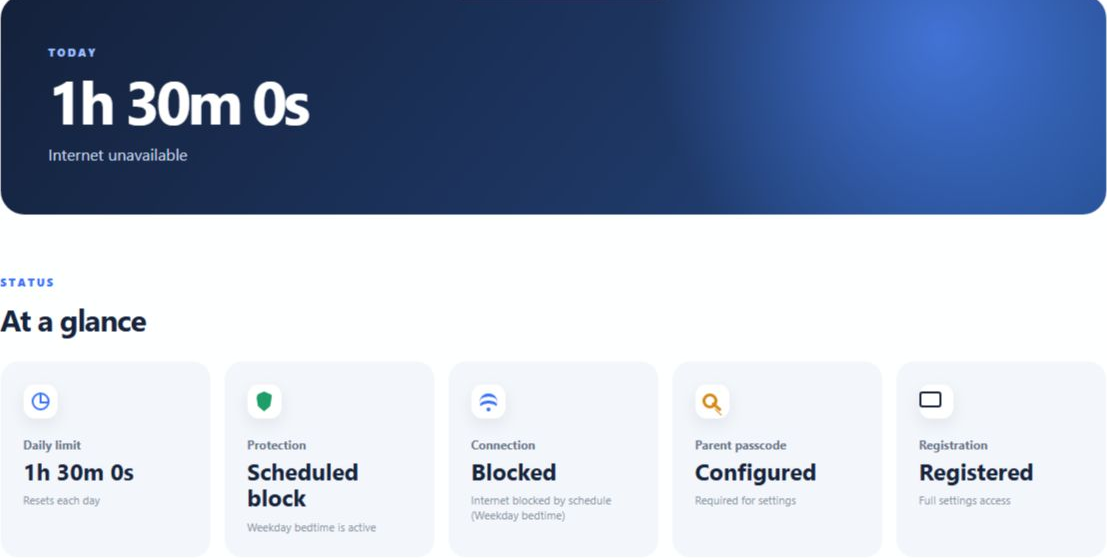
Read the five status cards without changing parent settings.
The five Dashboard cards explain today’s allowance, whether ScreenPact is enforcing it, the expected connection state, parent-passcode readiness and registration status.
You are not trying to change anything—you simply want to know: How much time is left? Is protection on? Why is the internet currently unavailable?
Shows today’s normal allowance and the remaining time available. Today-only adjustments are reflected in the current value.
Enabled means ScreenPact is enforcing the daily timer, Start/Pause agreement and configured schedules. Bypass or Protection paused is the highest-priority state: all ScreenPact blocking, including an active school-time or bedtime schedule, is suspended. That off state is saved and remains off after Windows restarts; the parent must turn Protection on again manually.
Explains whether the PC should currently have external internet access under ScreenPact’s rules.
Shows whether a six-digit parent passcode has been configured. It never displays the passcode itself.
Displays the active 14-day trial, remaining trial days, Registered state or expired-trial state.
| Card | Typical status | What it means |
|---|---|---|
| Daily limit | Time remaining | Minutes available today, including a today-only adjustment. |
| Protection | Enabled / Bypass | Enabled enforces all rules. Bypass suspends every ScreenPact rule. |
| Connection | Available / Blocked | Whether external internet should currently be reachable. |
| Parent passcode | Configured | Sensitive settings require the private six-digit code. |
| Registration | Trial / Registered | Whether the trial or lifetime license currently authorizes settings. |