ScreenPact Help

Daily limits, bonuses and today’s adjustment

Use +5 or −5 minutes for a one-day reward or correction without changing tomorrow’s normal Windows internet limit.

Normal rule versus today’s exception

Weekday and weekend limits are the repeating family agreement. The +5 and −5 buttons change only today and automatically return to the normal plan tomorrow.

A parent’s moment

Real life does not follow one perfect rule

The normal daily budget should stay predictable, but today your child earned a small bonus—or used extra entertainment time elsewhere. Today’s adjustment handles the exception without rewriting tomorrow.

1

Separate the rule from the exception

The weekday and weekend limits are the family’s normal agreement. They answer, “What should happen on an ordinary day?” The +5 and −5 controls answer a different question: “What is fair today?” Keeping those ideas separate makes the rule predictable.
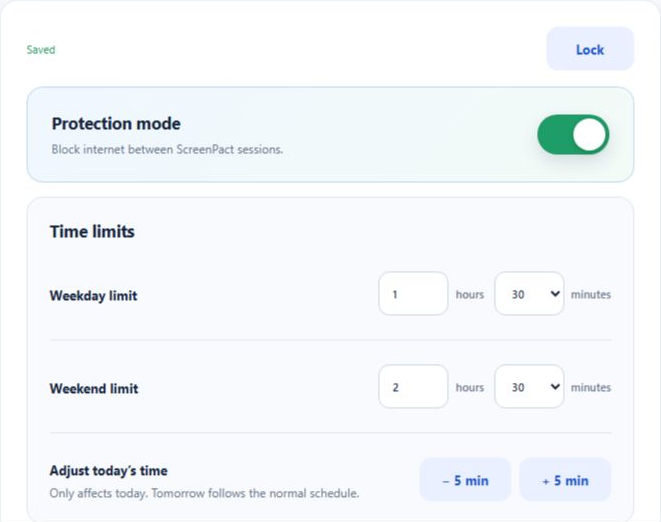
Parent Settings showing weekday and weekend limits, today-only minus five and plus five minute controls, and Saved confirmation
2

Use +5 as a visible bonus

Example

“You helped your brother before I asked.”

You decide that deserves a small bonus today. Open Parent Settings, enter the parent passcode and choose +5 min. For a ten-minute bonus, choose it twice. Tell the child what the bonus recognizes so ScreenPact reinforces the behavior, not just the screen time.

Use +5 for a one-day reward, an unexpectedly long online assignment or a family decision to extend today. Do not use it to repair a weekday limit that is wrong every day—change the normal limit instead.

3

Use −5 to balance today

Example

“You already watched extra television today.”

You want the total entertainment time to remain balanced. After parent verification, choose −5 min and explain the connection. ScreenPact will not subtract below zero.

Use −5 as a calm, specific adjustment—not a mysterious punishment. The child should know what changed, why it changed and that tomorrow’s normal agreement still stands.

4

Confirm the adjustment

The +5 and −5 buttons are immediate actions; there is no extra Save button. After each press, ScreenPact shows Added five minutes to today or Removed five minutes from today and refreshes the remaining time. Stop when the total is correct, then open Dashboard to double-check it.

5

Tomorrow returns to normal

Today-only adjustment expires with the day. On the next weekday or weekend day, ScreenPact loads the normal allowance automatically. A bonus does not become an entitlement, and a correction does not silently become a permanent punishment.

6

Know when to change the normal limit

If you press +5 or −5 almost every day, the family plan is probably unrealistic. Talk again, change the weekday or weekend limit, save it and explain the new baseline.

7

When time reaches zero

A new session cannot start and external internet remains unavailable. A parent may add time for a genuine exception, but ScreenPact’s educational value comes from letting the agreed boundary mean something.

What today’s adjustment does—and does not do

It does: change only today’s available time in five-minute steps.

It does not: change tomorrow, rewrite the weekday/weekend rule, identify what the child watched, or decide whether a reward is deserved.